


Working at a desk for long hours has become a regular part of modern life. Whether you work from home or in an office, spending most of the day sitting in front of a computer can affect your posture, flexibility, and overall physical well-being. Poor workstation arrangements, prolonged sitting, and repetitive movements may contribute to back pain, neck stiffness, shoulder tension, and wrist discomfort.
The good news is that small changes to your workspace and daily routine can make a significant difference. Practising proper ergonomics helps you maintain a comfortable working position, reduce unnecessary strain, and support better movement throughout the day.
In this guide, we explore practical ergonomic tips for desk workers and explain how professional services such as Physiotherapy, Chiropractic, Osteopathic Manipulation, and Dry Needling may help manage work-related musculoskeletal discomfort.
1. Adjust Your Chair for Proper Posture
Your office chair plays an important role in supporting your spine during extended working hours. An unsuitable chair or incorrect sitting position can place additional stress on your lower back and hips.
Follow these tips to improve your sitting posture:
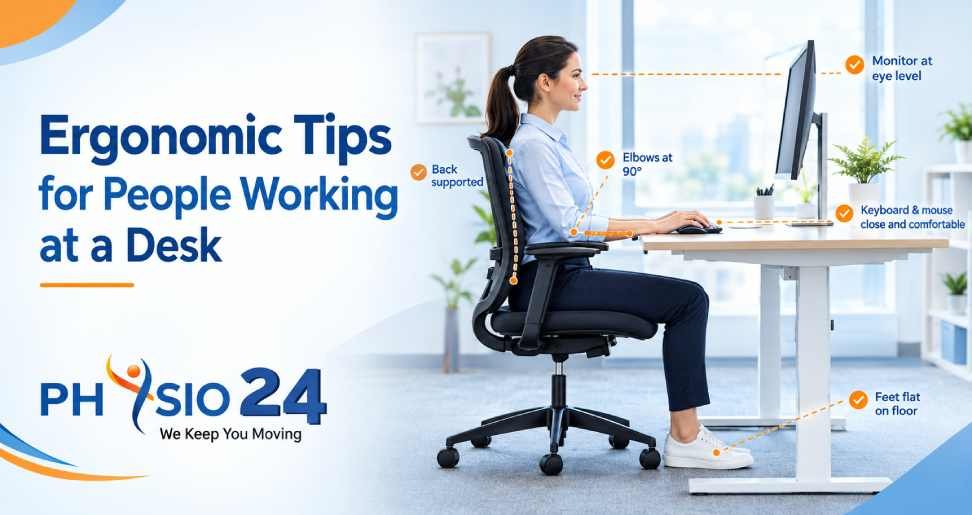
- Keep your feet flat on the floor or use a footrest if necessary.
- Adjust your chair so your knees are approximately level with your hips or slightly lower.
- Sit back in the chair and use the backrest to support your lower back.
- Keep your shoulders relaxed rather than raised or rounded forward.
- Avoid sitting on the edge of your chair for extended periods.
If your chair has adjustable lumbar support, position it to support the natural inward curve of your lower back.
Remember that good posture does not mean holding one rigid position all day. Changing positions regularly is just as important as maintaining a comfortable sitting posture.
2. Position Your Monitor at Eye Level
The position of your computer monitor can influence how you hold your head and neck throughout the working day. A screen placed too low may encourage you to bend your neck forward, while a screen positioned too high can cause neck strain.
For a more comfortable setup:
- Position the monitor directly in front of you.
- Place the top of the screen at or slightly below eye level, depending on your comfort.
- Keep the screen approximately an arm’s length away and adjust it for readability.
- Increase the text size if you frequently lean forward to read.
- Position the screen to minimise glare from windows and overhead lights.
Laptop users may benefit from a laptop stand combined with an external keyboard and mouse. This arrangement allows the screen to sit higher while keeping the arms in a more comfortable position.
3. Keep Your Keyboard and Mouse Within Easy Reach
Reaching repeatedly for a keyboard or mouse can increase tension in your shoulders, forearms, and wrists. A well-arranged desk helps keep your upper body relaxed while you work.
Place your keyboard and mouse close enough that you can use them without stretching your arms. Keep your elbows near your sides and approximately at a right angle, adjusting your workstation to suit your body.
Your wrists should remain relatively straight while typing. Avoid resting them against hard desk edges or bending them sharply upward or sideways.
If you experience frequent wrist discomfort, review your keyboard height, mouse position, and typing habits. Persistent pain, tingling, numbness, or weakness should be assessed by a qualified healthcare professional.
4. Take Regular Movement Breaks
Even a carefully designed workstation cannot eliminate the effects of sitting in one position for too long. Regular movement helps break up prolonged sitting and gives your muscles and joints opportunities to change position.
Try incorporating these habits into your working day:
- Stand up and move around regularly.
- Walk briefly between meetings or during phone calls.
- Change your sitting position throughout the day.
- Perform gentle shoulder rolls and comfortable neck movements.
- Alternate between sitting and standing if you have an adjustable desk.
You can also use reminders to encourage movement between tasks. Rather than waiting until you feel stiff, build short activity breaks into your daily schedule.
The objective is not to maintain perfect posture every minute. It is to avoid remaining in the same position for unnecessarily long periods.
5. Incorporate Simple Desk Stretches
Gentle stretching can help reduce feelings of stiffness associated with prolonged desk work. Choose movements that feel comfortable and avoid forcing any stretch.
Neck movements: Slowly turn your head from side to side within a comfortable range. Avoid sudden movements or pushing your head into an uncomfortable position.
Shoulder rolls: Gently roll your shoulders backward and forward to reduce tension around the upper back and shoulders.
Chest stretch: Stand near a doorway, place your forearms against the frame if comfortable, and gently move forward until you feel a mild stretch across your chest.
Wrist movements: Open and close your hands, move your wrists gently, and relax your fingers between periods of typing.
Standing movement: Stand up, walk briefly, and gently move your hips and ankles after extended sitting.
Stop any movement that causes sharp pain, dizziness, tingling, or worsening symptoms. If you have an existing injury or persistent discomfort, seek professional guidance before starting a stretching routine.
6. Maintain a Comfortable Desk Environment
Your overall workstation arrangement can affect how comfortably you work throughout the day. In addition to your chair and monitor, consider your desk height, lighting, and available space.
Keep frequently used items within easy reach so you do not repeatedly twist your body or stretch your arms. Ensure that your feet have enough room underneath the desk and that cables do not obstruct movement.
Good lighting also matters. Position your monitor to reduce reflections and adjust screen brightness to a comfortable level. If you regularly use a phone while working, consider a headset or speaker function instead of holding the phone between your ear and shoulder.
A practical ergonomic setup should support your individual needs rather than force you into an uncomfortable standard position.
7. Understand the Role of Physiotherapy in Desk-Related Pain
If neck stiffness, back pain, shoulder discomfort, or repetitive strain symptoms continue despite improving your workstation, professional assessment may help identify contributing factors.
Physiotherapy focuses on assessing movement, improving mobility, building strength, and helping people manage pain. A physiotherapist may recommend tailored exercises, posture education, activity modifications, and a gradual return to comfortable movement.
For office workers, a personalised plan may address reduced mobility, muscular weakness, movement habits, and difficulties performing everyday activities.
Physio 24 offers physiotherapy-related services for people seeking support with pain management, movement, and physical rehabilitation. You can explore the relevant services on the Physio 24 website and use the appropriate service-page links within your website when discussing specific treatment options.
Seeking advice early can be helpful when symptoms interfere with work, sleep, exercise, or daily activities.
8. Explore Chiropractic and Osteopathic Manipulation
Chiropractic and Osteopathic Manipulation are manual approaches that may be used to address selected musculoskeletal problems.
Chiropractic care commonly focuses on the assessment and management of musculoskeletal conditions, particularly those involving the spine. Depending on the individual’s condition and clinical assessment, care may include manual techniques, movement advice, and exercises.
Osteopathic Manipulation involves hands-on techniques intended to assess and address movement restrictions and musculoskeletal discomfort. The techniques selected should be appropriate for the individual’s symptoms, medical history, and treatment goals.
These approaches are not necessary for every desk worker, and neither guarantees a cure for work-related pain. A qualified practitioner should explain the expected benefits, potential risks, and suitable alternatives before treatment.
If you are considering these services through Physio 24, check the website’s relevant service information and confirm practitioner qualifications and availability before booking.
9. Understand When Dry Needling May Help
Dry Needling is a technique in which a trained practitioner inserts fine needles into selected tissues, often targeting muscular trigger points or areas of discomfort. It may be considered as one component of a broader musculoskeletal treatment plan.
Some people seek Dry Needling for muscle tension or discomfort associated with prolonged desk work. However, its effectiveness varies depending on the condition, and it should not replace an appropriate assessment, movement programme, or ergonomic changes.
Treatment should only be provided by a suitably trained and qualified professional who follows appropriate safety and hygiene procedures.
If you are exploring Dry Needling as part of your care, discuss the potential benefits, risks, and alternatives with your practitioner.
10. Build Healthy Desk-Working Habits
Long-term comfort depends on consistent habits rather than a single ergonomic adjustment. Start with a few practical changes and gradually introduce additional improvements.
Set up your chair and monitor correctly, keep your keyboard within easy reach, take regular movement breaks, and include appropriate physical activity in your daily routine. Make time for exercise outside working hours to support general strength, endurance, and mobility.
Pay attention to early warning signs. Persistent pain, increasing stiffness, numbness, weakness, or symptoms that interfere with normal activities deserve professional assessment rather than being dismissed as an unavoidable part of office work.
Conclusion
Ergonomic tips for people working at a desk can help create a more comfortable workspace and reduce unnecessary physical strain. Correct chair adjustment, monitor positioning, comfortable keyboard use, regular movement, and gentle stretching all contribute to healthier working habits.
When discomfort persists, professional support may help you understand its causes and develop a suitable management plan. Physiotherapy, Chiropractic, Osteopathic Manipulation, and Dry Needling may have a role in selected cases, depending on individual needs and clinical assessment.
Physio 24 can be a starting point for exploring physiotherapy and related musculoskeletal care options. Visit Physio24.in to learn more about the available services and identify appropriate support for improving movement and managing discomfort.
By combining better workstation ergonomics with regular movement and informed healthcare decisions, desk workers can take practical steps towards greater comfort and improved everyday well-being.


Leave a Reply
You must belogged in to post a comment.